
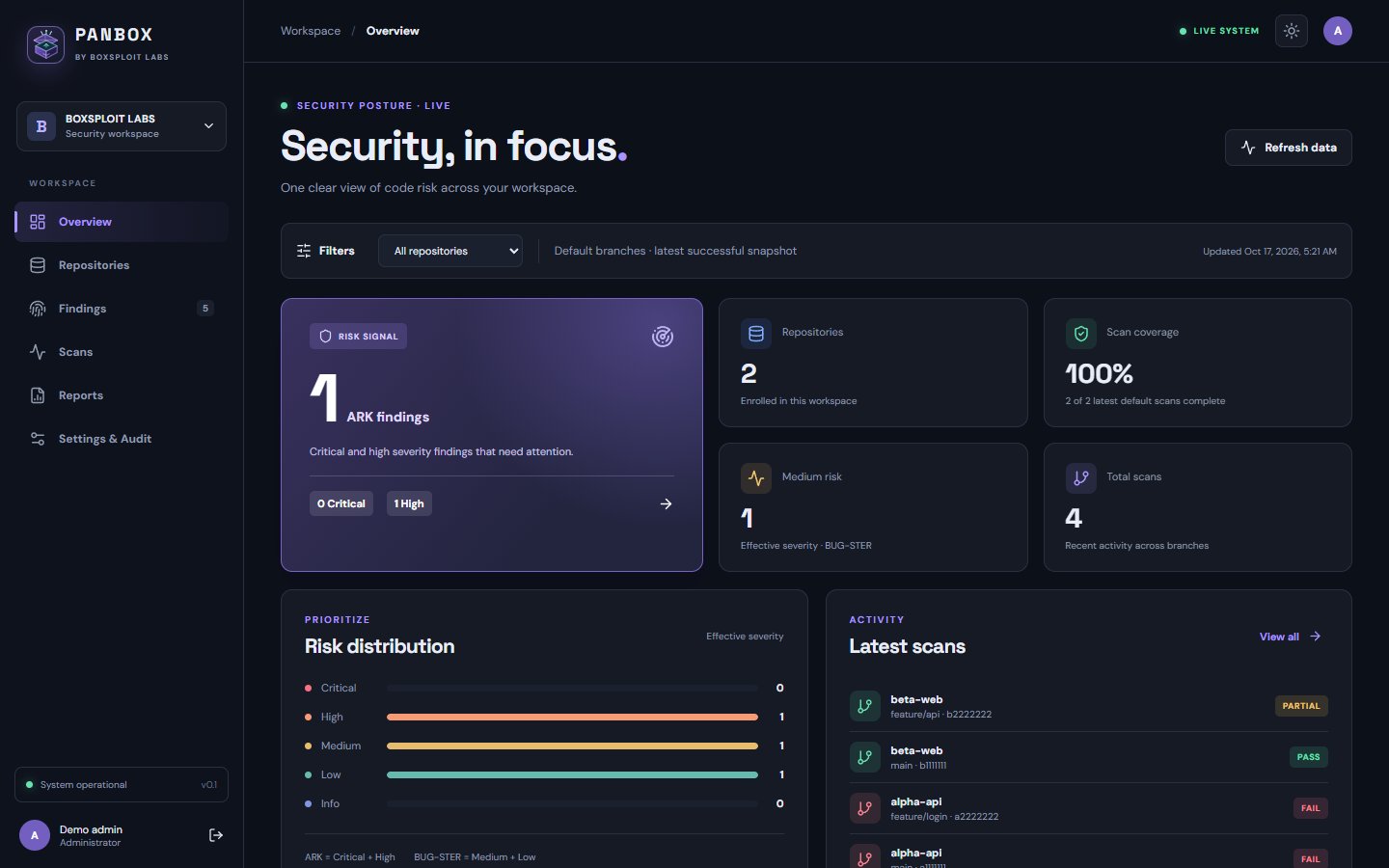
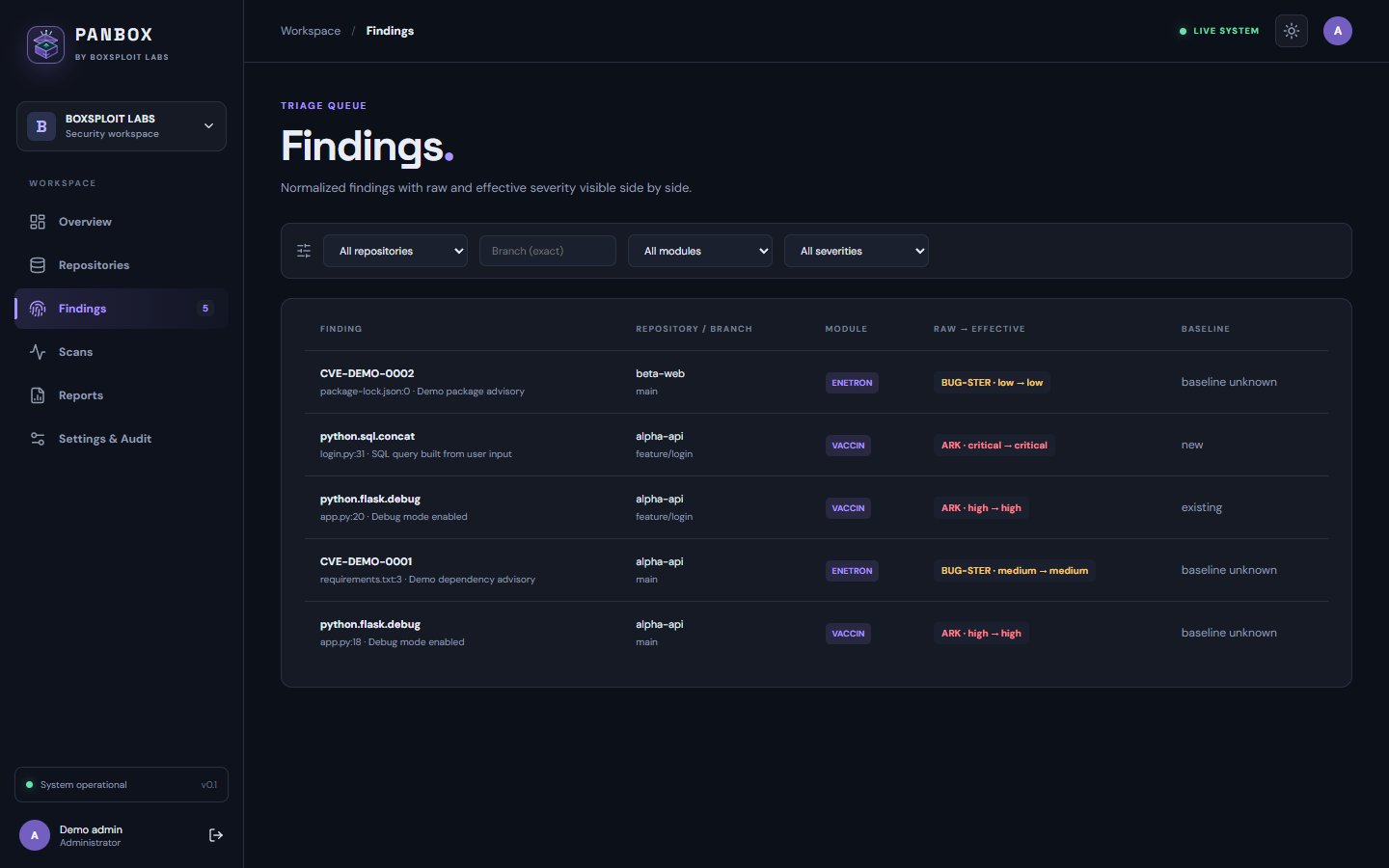
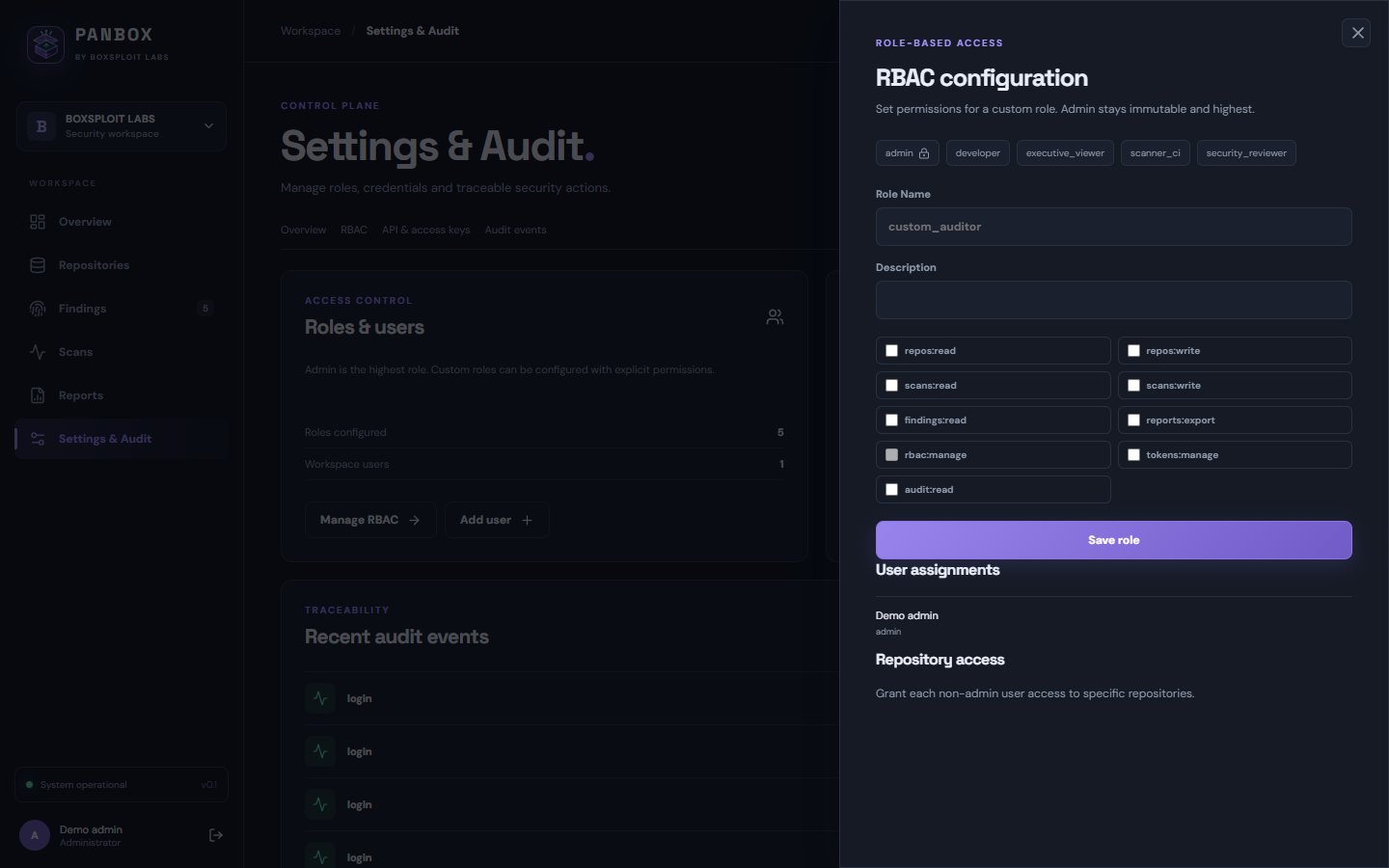
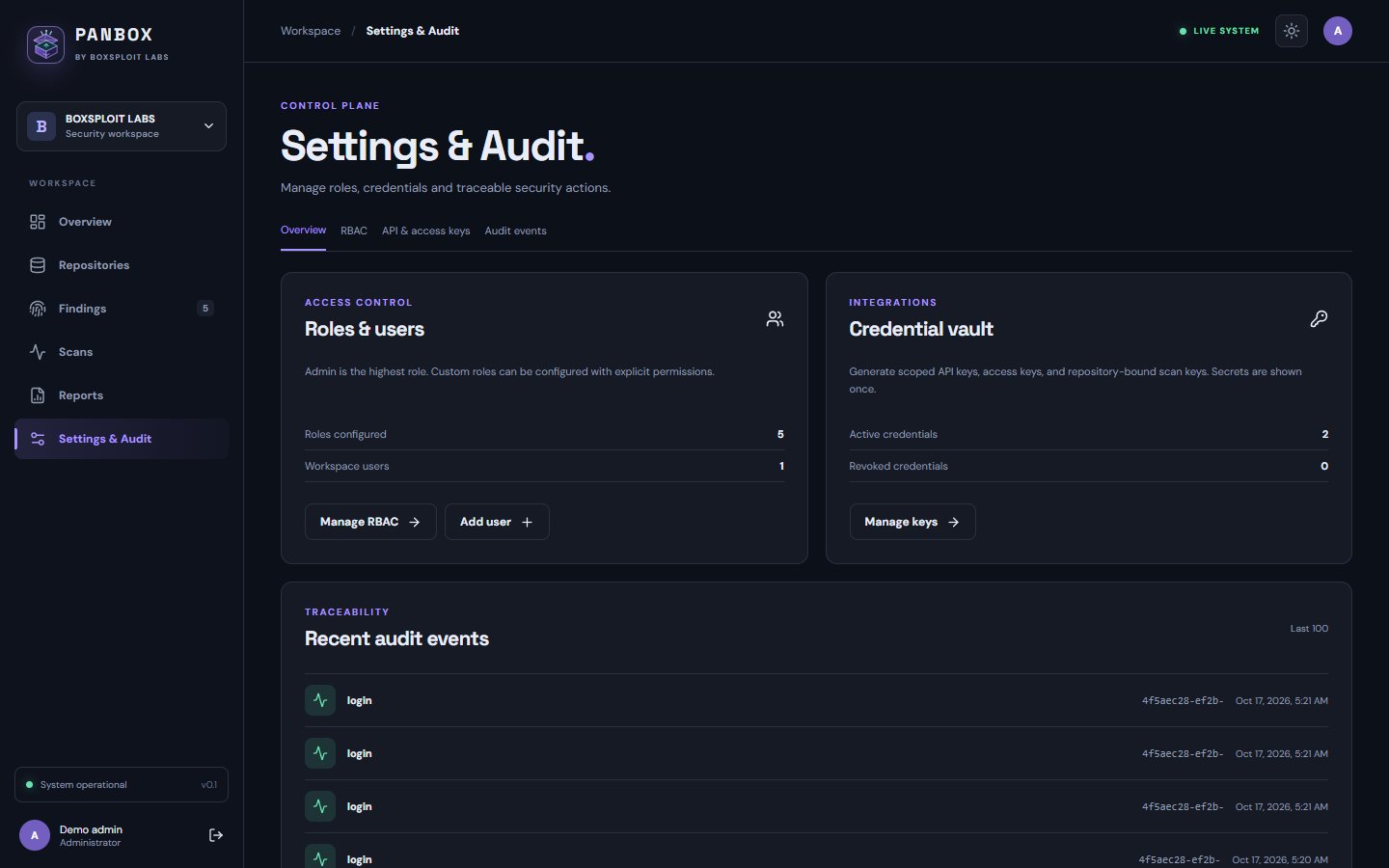
Runner on the PANBOX LAN posts to the private API. The CI gate is synchronous.
BOXSPLOIT LABS / PRODUCT DOCUMENTATION v0.1 PILOT

PANBOXProduct guide
A practical interactive guide to install, connect, operate, and assess PANBOX.
01 / PRODUCT PREVIEW
See the control plane.
Real screens from the running PANBOX pilot, populated with synthetic demo repositories and findings. Open an image to inspect it full size.
02 / HIGH-LEVEL ARCHITECTURE
From commit to decision.
The agent fetches each repository scan policy, scans on a protected runner, uploads findings, and receives a gate decision from the private control plane.
- 01 / SOURCE
Git host + CI
GitHub · GitLab · Bitbucket · Azure Repos · Gitea · Git
Checks out the repository - 02 / DETECT
PANBOX agent
VACCIN source rules + ENETRON pinned dependencies
Fetches scan policy, then runs on the protected runner - 03 / DECIDE
Private Go API
Validates the CI API key and PANBOX project ID; computes branch snapshots and gate
No scanner jobs on the dashboard - 04 / PRESENT
Database + UI
PostgreSQL stores state; React shows findings, RBAC, audit, and reports
Operator browser via loopback or HTTPS
PANBOX → SCM
An Admin-managed GitLab service account or GitHub App discovers permitted private repositories and reads branch metadata over outbound HTTPS. With AI review enabled and source permission granted, PANBOX also fetches bounded snippets at the scanned commit.
AGENT → PANBOX
The CI runner scans its checkout and uploads normalized results with a PANBOX API key. It does not upload raw source or run AI; optional AI review starts later on the server.
Optional AI review: after the CI gate returns, PANBOX reads a bounded source window through its GitHub/GitLab connection. Choose a separate Codex host worker using a ChatGPT login and Codex allowance, or an API provider with separate billing. Admin sees worker login state and process events; findings show individual evaluation status and advisory results. See setup and boundaries →
PANBOX opens a reverse tunnel to a reachable relay; CI uses a forward tunnel. The gate is synchronous.
CI stores a bundle; PANBOX fetches and imports it later. The gate cannot block that CI job.
03 / WHY PANBOX
Findings with context.
PANBOX combines first-party source rules and dependency parsing with a private decision workflow. Review supported rule families and lockfile inputs below.
PANBOX-owned checks
Native VACCIN and ENETRON findings become repository and branch snapshots in one queue. Partial scans stay unverified and preserve the last successful posture.
A gate your team controls
Set allowed modules and gate threshold per repository. Recast effective severity with an audited reason; CI still receives distinct pass, fail, incomplete, and authorization outcomes.
Private SCM, private PANBOX
GitLab service accounts and GitHub Apps let PANBOX discover and verify private repositories without making them public. CI can use a local runner, SSH relay, or artifact import; PANBOX needs no public IP.
Traceable fixes, private control
Each source finding carries a path and line, a scanned-commit link where available, a targeted suggestion, and a public OWASP or framework reference. Admin sets roles, scoped keys, and audited recasts while agents scan on runners.
04 / CAPABILITY MAP
What is available now.
VACCIN and ENETRON use first-party PANBOX logic. Coverage and known limitations are stated explicitly below.
VACCIN / SASTAVAILABLE IN PILOT
Native lexical checks cover Java/JSP, JavaScript/TypeScript, Python and Django templates, PHP, and Go. Agent alpha.7 adds 18 Python and 20 JavaScript/TypeScript checks for direct request-controlled operations and unsafe settings. Known bundled JavaScript is excluded to reduce noise. The engine does not yet provide compiler-backed AST or interprocedural taint analysis. If no dependency manifest exists, ENETRON is skipped and a completed source scan can pass.
ENETRON / SCAAVAILABLE IN PILOT
Reads npm/pnpm/Yarn/Bun, Python requirements/Pipfile/Poetry/uv/PDM, Go modules, Maven/Gradle, and Composer lock inputs; queries OSV in batches with pagination. Maven inheritance/BOM and full transitive resolution are not computed. OSV supplies advisory data, not scanner execution.
AI REVIEW / SERVEROPTIONAL BETA
After CI returns the native gate, PANBOX can review up to ten existing VACCIN findings through a separate ChatGPT-authenticated Codex host worker, or an optional OpenAI/Anthropic API route. Admin sees host login state and process events; each finding shows its evaluation status and saved advice. Source snippets come from the connected GitHub/GitLab account at the scanned commit; AI never changes the gate or code.
TESLA / IACROADMAP
Infrastructure as Code detection is not active in this pilot. Do not replace your current IaC scanner yet.
RIDER / SECRETSROADMAP
Secret discovery is not active in this pilot. Evidence filtering is not a substitute for secret scanning.
Pilot scope and validation steps are detailed in the guide below. VACCIN is lexical and has no independently measured false-positive rate; validate it alongside existing controls. Production sizing is not yet benchmarked.
DOCUMENTATION / 15 CHAPTERSEnglish · light and dark
Start with the path that matches your job: server operator installs the private dashboard once; DevOps adds an agent-only step to each CI job. The agent is one Go binary. The runner does not need Node, Python, Semgrep, Grype, or a PANBOX server installation.
Choose your task
00 / CI TEMPLATESGitHub, GitLab, or other CI config
01 / SERVER OPERATORStart the dashboard once
02 / PRIVATE REPOSConnect GitHub or GitLab and discover repos
02 / MANUAL SETUPTest SCM, detect branch, enroll repo
03 / DEVOPSAdd agent only to CI
04 / NETWORKConnect public SCM to private PANBOX
05 / SCAN POLICYControl modules and gate per repository
06 / TRIAGE + EXPORTFind Recast severity and export PDF
07 / MCPConnect Codex with read-only MCP
08 / AI REVIEWReview findings on the PANBOX server
Admin opens Settings & Audit → SCM connections. Add a GitLab service account token with read_api, or a GitHub App installed on selected repositories with Metadata read permission. GitLab read_api already permits repository file reads; add GitHub Contents: read if you enable server-side AI source review. PANBOX tests access and can enroll up to 500 visible repos on save. Use Sync after access changes. Admin can edit, disable, or delete the connection; remove/restore a repository; and pause/resume scans.
Copy each PANBOX project ID into its CI configuration. The runner keeps its own checkout access and uploads with a separate PANBOX API key. PANBOX reads SCM metadata through outbound HTTPS; when Admin enables AI review, the server also reads bounded source snippets at the scan commit.
See GitHub/GitLab setup and every button ↗Enroll the project in PANBOX, copy its internal ID to PANBOX_REPOSITORY_ID, and create one API key with scans:write as protected PANBOX_API_KEY. Set PANBOX_SERVER to a runner-reachable API URL. Private GitLab/GitHub source uses CI checkout credentials; it never needs to be public. To save runner minutes, add one PANBOX invocation to an existing protected build job instead of creating another scan job.
GitHub Actions
Place in .github/workflows/panbox.yml. Set repository variables PANBOX_SERVER and PANBOX_REPOSITORY_ID, and secret PANBOX_API_KEY.
name: PANBOX scan
on:
  push:
  workflow_dispatch:
jobs:
  panbox:
    runs-on: ubuntu-latest
    permissions:
      contents: read
    steps:
      - uses: actions/checkout@v7
        with:
          persist-credentials: false
      - run: curl -fsS "$PANBOX_SERVER/readyz"
        env:
          PANBOX_SERVER: ${{ vars.PANBOX_SERVER }}
      - name: Install agent and scan
        env:
          PANBOX_SERVER: ${{ vars.PANBOX_SERVER }}
          PANBOX_REPOSITORY_ID: ${{ vars.PANBOX_REPOSITORY_ID }}
          PANBOX_API_KEY: ${{ secrets.PANBOX_API_KEY }}
          PANBOX_DEFAULT_BRANCH: ${{ github.event.repository.default_branch }}
          PANBOX_VERSION: v0.1.0-alpha.12
        run: |
          curl -fsSL "https://github.com/alterwriter/PANBOX/releases/download/${PANBOX_VERSION}/install-agent.sh" -o "$RUNNER_TEMP/install-panbox-agent.sh"
          sh "$RUNNER_TEMP/install-panbox-agent.sh" "$PANBOX_VERSION" "$RUNNER_TEMP/panbox-bin"
          "$RUNNER_TEMP/panbox-bin/panbox" version
          "$RUNNER_TEMP/panbox-bin/panbox" go --server "$PANBOX_SERVER" --repo "$PANBOX_REPOSITORY_ID" --path . --branch "$GITHUB_REF_NAME" --commit "$GITHUB_SHA"
GitLab CI
Add to .gitlab-ci.yml. Set PANBOX_SERVER and PANBOX_REPOSITORY_ID as CI variables and PANBOX_API_KEY as a masked, protected variable. This example runs on protected branches, including protected feature branches.
panbox_scan:
  stage: test
  image: alpine:3.22
  variables:
    PANBOX_VERSION: v0.1.0-alpha.12
  before_script:
    - apk add --no-cache curl ca-certificates git
  script:
    - curl -fsS "$PANBOX_SERVER/readyz"
    - curl -fsSL "https://github.com/alterwriter/PANBOX/releases/download/${PANBOX_VERSION}/install-agent.sh" -o install-panbox-agent.sh
    - sh install-panbox-agent.sh "$PANBOX_VERSION" "$CI_PROJECT_DIR/.panbox/bin"
    - '"$CI_PROJECT_DIR/.panbox/bin/panbox" version'
    - '"$CI_PROJECT_DIR/.panbox/bin/panbox" go --server "$PANBOX_SERVER" --repo "$PANBOX_REPOSITORY_ID" --path . --branch "$CI_COMMIT_REF_NAME" --default-branch "$CI_DEFAULT_BRANCH" --commit "$CI_COMMIT_SHA"'
  rules:
    - if: '$CI_COMMIT_REF_PROTECTED == "true"'
Other CI / shell runner
After checkout, inject PANBOX_SERVER, PANBOX_REPOSITORY_ID, and PANBOX_API_KEY from your CI secret store. This is the same agent for any SCM; the runner must reach the PANBOX API.
PANBOX_VERSION=v0.1.0-alpha.12
curl -fsS "$PANBOX_SERVER/readyz"
curl -fsSL "https://github.com/alterwriter/PANBOX/releases/download/${PANBOX_VERSION}/install-agent.sh" -o install-panbox-agent.sh
sh install-panbox-agent.sh "$PANBOX_VERSION" .panbox/bin
.panbox/bin/panbox version
.panbox/bin/panbox go --server "$PANBOX_SERVER" --repo "$PANBOX_REPOSITORY_ID" --path .
No matching chapter. Try a different term.
Git host/CI -> protected runner -> PANBOX agent -> private PANBOX API -> PostgreSQL
                                  | VACCIN: source rules            |
                                  | ENETRON: packages -> OSV        +-> React UI
Result: CI receives pass, gate failure, incomplete, or authorization failure; operators see repository and branch snapshots. The CI bundle contains no raw source; optional server-side AI review separately fetches bounded snippets through a connected SCM account. ENETRON sends package names and versions to an OSV-compatible advisory API. The agent uploads normalized findings with a PANBOX API key, without raw source snippets. See the architecture and network diagram.
Why teams may choose PANBOX
PANBOX's practical distinction is the combination of these controls in one self-hosted pilot, not a claim that no other vendor has any one feature:
| Capability | Implemented PANBOX behavior |
|---|---|
| Private delivery | A protected local runner, SSH relay, or later artifact import can reach a private dashboard without a public PANBOX IP. Only the first two can enforce a synchronous CI gate. |
| Source stays on runner | Native VACCIN examines the checkout in CI; the API receives normalized findings, paths, and lines, not raw source snippets. ENETRON sends package coordinates to OSV-compatible advisory data. |
| Review and policy | Per-repository modules/gate, RBAC, scoped keys, audited severity recasts and dispositions, branch history, and filtered exports sit beside the findings. |
| Actionable context | A finding carries file/line, a scanned-commit source link when available, a suggested fix, and a curated public remediation reference. The text is guidance; it does not prove exploitability or automatically modify code. |
Other SAST/SCA platforms may offer overlapping features. PANBOX's alpha scanner is lexical, lacks cross-function taint analysis, and has no measured false-positive rate or production-scale benchmark. Evaluate detection quality on your own representative repositories before replacing an existing control.
- Server operator, once: Docker Engine/Desktop with Linux containers and Compose v2. Start with section 3 on Debian/Linux/macOS or section 4 on Windows. Debian is the initial production target.
- DevOps, per repository: enroll a repository, create one API key with
scans:write, set CI secrets, and run section 6. The runner needs outbound HTTPS to GitHub Releases and the advisory API, plus a route to the private PANBOX API. - No public IP/domain: choose a route in section 7 before writing the CI job.
PANBOX binds HTTP 8080 and PostgreSQL 5434 to host loopback by default. Change PANBOX_HOST_PORT or PANBOX_DB_HOST_PORT in .env if needed. Keep PostgreSQL private.
Goal: bring up the private API and UI once. Run on the server host:
git clone https://github.com/alterwriter/PANBOX.git
cd PANBOX
sh scripts/init-local.sh
docker compose --env-file .env -f deploy/docker-compose.yml up -d --build
curl -fsS http://127.0.0.1:8080/readyz
Expected: /readyz succeeds. Open http://127.0.0.1:8080 on the server and sign in with PANBOX_BOOTSTRAP_EMAIL and PANBOX_BOOTSTRAP_PASSWORD from the ignored .env. The initializer creates secrets with restricted permissions and refuses to overwrite an existing .env. Bootstrap credentials apply only when the database is first initialized; retain its volume on routine restarts.
Optional demo: PANBOX_SERVER=http://127.0.0.1:8080 bash scripts/seed-demo.sh needs curl and jq, then prompts for the admin password. Demo findings are synthetic.
Goal: run the same Linux containers through Docker Desktop. In PowerShell:
git clone https://github.com/alterwriter/PANBOX.git
cd PANBOX
./scripts/init-local.ps1
docker compose --env-file .env -f deploy/docker-compose.yml up -d --build
Invoke-RestMethod http://127.0.0.1:8080/readyz
Expected: the same dashboard and API as section 3. Use ./scripts/seed-demo.ps1 only for optional demo data. Run one initializer for a new .env, not both.
Server variables and dashboard upgrades
Server .env variable |
Required | Purpose |
|---|---|---|
PANBOX_DB_PASSWORD |
Yes | Strong random PostgreSQL password. |
PANBOX_BOOTSTRAP_EMAIL / PANBOX_BOOTSTRAP_PASSWORD |
Yes | Initial admin; password is used only when the database is first created. |
PANBOX_SECURE_COOKIE |
Production | Set true when the dashboard uses HTTPS. |
PANBOX_HOST_PORT / PANBOX_DB_HOST_PORT |
No | Host ports default to 8080 / 5434 and bind to loopback. |
PANBOX_SCM_ALLOWED_HOSTS |
Optional | Allowed HTTPS origins for self-hosted SCM metadata. |
PANBOX_SCM_ENCRYPTION_KEY |
Private SCM integration | 64 random hex characters. New local initializers generate it; existing installations can use openssl rand -hex 32. Back it up with PostgreSQL. |
Upgrade on Debian/Linux: back up the database, record the current commit, pull main, and rebuild:
docker compose --env-file .env -f deploy/docker-compose.yml exec -T db pg_dump -U panbox panbox > "panbox-db-$(date -u +%Y%m%dT%H%M%SZ).sql"
git rev-parse HEAD > .panbox-previous-version
git pull --ff-only origin main
docker compose --env-file .env -f deploy/docker-compose.yml up -d --build
curl -fsS http://127.0.0.1:8080/readyz
Migrations run when the new server starts. For a schema rollback, restore the database backup together with the previous code version. Do not run docker compose down -v during an upgrade.
Purpose: an SCM connection lets the PANBOX server read permitted repository metadata, including private repositories and default branches. The dashboard does not clone source, trigger a pipeline, or use this credential to upload scans. The CI runner performs checkout and scanning, then uploads with its own PANBOX_API_KEY and PANBOX_REPOSITORY_ID.
Before connecting: keep PANBOX_SCM_ENCRYPTION_KEY stable in the server .env (new installs create one; existing installs can generate openssl rand -hex 32). Back it up with PostgreSQL. The PANBOX host needs outbound HTTPS to the SCM. For GitLab self-managed or GitHub Enterprise, allowlist the exact host in PANBOX_SCM_ALLOWED_HOSTS and enter its HTTPS origin; leave origin blank for public GitHub/GitLab cloud. No PANBOX public IP or webhook is required.
| Provider | Prepare in the SCM | Enter in PANBOX |
|---|---|---|
| GitLab | Create a service account with access to the target group/projects and a token with read_api. |
Select GitLab service account, enter a label and token, and choose cloud or the allowed self-managed HTTPS origin. |
| GitHub | Create a GitHub App, grant repository Metadata: read, install it only on the intended repositories, and download its private key. | Select GitHub App, enter the App ID, installation ID, PEM private key, label, and optional allowed Enterprise origin. |
- Sign in as Admin and open Settings & Audit → GitHub & GitLab connections → Manage SCM connections. Click Connect GitHub or GitLab. This button opens the new-connection form; it does not connect or import anything until you submit it.
- Set Connection enabled to allow reads. Set Automatically enroll only if all repositories visible to this credential should become PANBOX projects. Click Connect, test and discover. PANBOX tests the credential, saves it encrypted, reads up to 500 permitted repository entries, and imports them only when auto-enroll is on.
- In Repositories, copy each imported PANBOX project ID to CI variable
PANBOX_REPOSITORY_ID. Create a separate PANBOX API key withscans:writeasPANBOX_API_KEY. Check runner-to-PANBOX connectivity before the first scan; the SCM test checks the server-to-SCM route only.
| Button | What it does |
|---|---|
| Edit | Opens the selected connection form; change its label, status, auto-enroll, or replace credentials. Save tests access again. |
| Discover | Reads currently visible repositories and shows enrolled, ready, or excluded state. It does not import when auto-enroll is off. |
| Sync | Refreshes metadata and imports newly visible repositories when auto-enroll is enabled. It does not start a CI scan. |
| Disable / Enable | Stops or resumes metadata access and future sync for that connection; existing PANBOX projects and scan history remain. |
| Delete | Removes the stored SCM connection; enrolled projects and scan history remain. |
| Allow reimport | Clears an imported repository's exclusion after deliberate removal; use Sync to import it again. |
Keep the SCM credential limited to the repositories you intend to discover. If access testing fails, check token/App permissions, installation scope, outbound HTTPS, and the exact allowed self-hosted hostname. The connection screen reports these failures before saving.
| CI variable | Store as | Purpose |
|---|---|---|
PANBOX_SERVER |
Variable | Dashboard URL reachable by the runner, preferably HTTPS. |
PANBOX_REPOSITORY_ID |
Variable | Internal PANBOX project ID from the repository page. |
PANBOX_API_KEY |
Masked/protected secret | PANBOX key scoped to scans:write; no repository token is needed. |
PANBOX_VERSION |
Variable | Pinned agent release tag, e.g. v0.1.0-alpha.12. |
PANBOX_MODULES |
Optional variable | Modules for the GitLab example (defaults to vaccin,enetron); use vaccin when you intend to run SAST only. |
PANBOX_DEFAULT_BRANCH |
Optional | Set when the CI provider does not supply default branch metadata. |
Onboarding model: Enroll a PANBOX project before its first scan. Its project ID routes the upload but is not a secret. One API key with scans:write authenticates policy fetch and upload. Private SCM repositories do not need to be made public: CI's checkout credentials fetch source, while PANBOX receives only normalized results.
Once per repository, before changing the pipeline:
- Sign in as an admin or a user with
repos:write, then open Repositories -> Enroll repository. Select GitHub, GitLab, Bitbucket, Azure Repos, Gitea, or Other Git. - Enter name (display label, for example
PANBOX) and SCM repository ID or path (for examplealterwriter/PANBOX; GitLab may usegroup/subgroup/project). Select Test SCM connectivity and detect branch. Public metadata from GitHub, GitLab, Bitbucket, Azure Repos, or an operator-allowed Gitea host fills default branch automatically. Owner may be blank; it is display metadata, not RBAC or scan authorization. Display name, SCM path, and internal PANBOX ID are three different values. - Read the result before selecting Enroll repository. Verified metadata means the PANBOX host read the default branch. Waiting for CI means private/unreachable metadata; keep Auto-detect selected. The first authenticated CI upload can supply the true default branch, even when it scans a feature branch. PANBOX never guesses the first scanned branch is default. For self-hosted Git, add the exact HTTPS host to
PANBOX_SCM_ALLOWED_HOSTS. Copy PANBOX ID for CI toPANBOX_REPOSITORY_ID; this internal ID differs from the SCM path or GitLab project ID. - Select Create CI API key. The admin/key manager needs
tokens:manage,scans:write, and project access. Keepscans:write, optionally scope the key to this PANBOX project, and save the one-time secret as protected CI secretPANBOX_API_KEY. No separate repository token is needed. The key owner still needs project membership unless admin. - Open the row's Scan policy: enable scans, select VACCIN/ENETRON, and set the gate threshold. Set
PANBOX_SERVERin CI to the API URL reachable from the runner, such as PANBOX's LAN address.127.0.0.1works only when runner and server share a host. Never put an API key in repository files or untrusted pull request jobs. - From the runner using its CI checkout credentials, verify checkout succeeded (
git rev-parse --is-inside-work-tree), then check dashboard reachability, key, and ID with the commands below. The dashboard metadata check in step 2 does not prove either runner path. Once both succeed, run the agent job below. The first complete scan appears in Scans, with its findings in Findings.
curl -fsS "$PANBOX_SERVER/readyz"
curl -fsS -H "Authorization: Bearer $PANBOX_API_KEY" \
  "$PANBOX_SERVER/v1/repos/$PANBOX_REPOSITORY_ID/scan-config"
Branches after enrollment: every job reports its checkout branch, so a feature branch appears separately once CI runs PANBOX there. GitLab CI_DEFAULT_BRANCH and the GitHub template's PANBOX_DEFAULT_BRANCH report the actual default even from a feature branch. Other CI systems can set PANBOX_DEFAULT_BRANCH or use --default-branch. Without this metadata, default stays pending. The supplied GitLab job runs on protected branches; extend CI rules for others. Overview uses the default branch baseline. Recheck SCM refreshes auto-detected metadata.
Fix a wrong enrollment: click a repository row to open details. Edit changes display name, owner, and default branch; select Manual override when needed. Choose Self-hosted / enterprise and enter an HTTPS origin for GitHub Enterprise or GitLab self-managed; allowlist its exact host in PANBOX_SCM_ALLOWED_HOSTS. SCM identity can be edited until the first scan, then it is locked to preserve finding history. Admin Remove deletes an unscanned repository or archives a scanned one and revokes project-bound keys. Admin can Restore and use an API key with project access. A missing owner is safe: it never grants permission.
Custom native VACCIN rule: commit .panbox/rules.json to the scanned repository. PANBOX reads it on the runner before scanning, alongside built-in rules; an invalid file fails the VACCIN module rather than silently passing. Example:
{"rules":[{"id":"custom.team.unsafe-call","severity":"medium","message":"Unsafe call needs review","pattern":"unsafeCall\\(","extensions":[".js"]}]}
The JSON pattern above represents regex unsafeCall\(. IDs start with custom.; supported extensions are .py, .pyw, .js, .jsx, .ts, .tsx, .mjs, .cjs, .mts, .cts, .go, .java, .jsp, .php, and .phtml. Limit: 64 rules, 256 characters per pattern, 64 KiB file. Regexes can span lines after lexical comment/string stripping; they are not AST or taint analysis. Keep the rule file under code review and validate representative repositories.
Every Linux/macOS job: download the pinned installer from PANBOX release v0.1.0-alpha.12. It selects OS/CPU, downloads just the binary, checks SHA256SUMS, and installs in the job workspace without sudo:
PANBOX_VERSION=v0.1.0-alpha.12
curl -fsSL "https://github.com/alterwriter/PANBOX/releases/download/${PANBOX_VERSION}/install-agent.sh" -o install-panbox-agent.sh
sh install-panbox-agent.sh "$PANBOX_VERSION" .panbox/bin
.panbox/bin/panbox version
.panbox/bin/panbox go --server "$PANBOX_SERVER" --repo "$PANBOX_REPOSITORY_ID" --path .
Expected: exit 0 complete/pass; 1 gate failure; 2 incomplete/transport/config error; 3 rejected auth/permission. Copy the GitHub Actions job or GitLab CI job. On Windows, download install-agent.ps1 and run ./install-agent.ps1 -Version v0.1.0-alpha.12; it installs ./.panbox/bin/panbox.exe after checksum verification. Direct agent-only binaries are also available.
VACCIN provides first-party lexical rules for Java/JSP, JavaScript/TypeScript, Python, PHP, and Go. The current families include injection, unsafe execution/deserialization, XSS, SSRF, path traversal, TLS/cookie controls, cryptography, and risky framework/API use. ENETRON reads npm v1/v2/v3, pnpm, Yarn, Bun JSON; Python requirements/Pipfile/Poetry/uv/PDM; Go go.mod/go.sum; Maven pom.xml; Gradle gradle.lockfile; and PHP composer.lock. Maven only reads explicit or locally managed versions, not properties/BOM/parent inheritance. Queries to OSV-compatible advisory data are batched and paginated. When a repo has no supported dependency manifest, ENETRON is marked skipped and a completed VACCIN scan can still pass; malformed or unpinned manifests remain errors. Feature branches are scanned. baseline unknown is expected until PANBOX has a prior scan for that branch/base.
CI-to-dashboard sequence: (1) the runner downloads the pinned agent; (2) panbox go authenticates GET /v1/repos/{id}/scan-config with the CI API key; (3) the agent scans enabled modules in the checkout; (4) it posts one normalized JSON bundle to POST /v1/scans with Authorization: Bearer $PANBOX_API_KEY; (5) the API stores the snapshot and returns the gate verdict; (6) the agent exits 0 (pass), 1 (gate fail), 2 (incomplete/transport), or 3 (auth). There is no separate upload setup. Verify the policy from the runner with curl -fsS -H "Authorization: Bearer $PANBOX_API_KEY" "$PANBOX_SERVER/v1/repos/$PANBOX_REPOSITORY_ID/scan-config".
Keep CI usage low: add one PANBOX invocation to an existing protected build job after checkout; do not create a second scan job when shared-runner minutes are limited. PANBOX reads source and dependency manifests from the checkout, not the built container image. If no supported manifest exists, ENETRON reports skipped and VACCIN can still complete. Use --modules vaccin only when you intend to run SAST alone.
- Local protected runner (recommended): polls any SCM over outbound HTTPS and posts to PANBOX on its LAN. No public PANBOX port; synchronous gate. Use the GitHub or GitLab example.
- SSH relay: PANBOX opens an outbound reverse tunnel to a reachable relay; a shared runner opens a forward tunnel. No PANBOX inbound internet port; synchronous gate. Pin host keys and restrict identities. See the GitLab relay example.
- Artifact import: CI writes
panbox-results.json; a private host fetches and imports it later. No inbound route or relay; the later gate cannot block that CI job. GitLab artifact example andpanbox relay-pullautomate GitLab; other SCMs need their artifact download step before genericpanbox go --bundleimport.
Check: from a synchronous runner, curl -fsS "$PANBOX_SERVER/readyz" must work. A public repository does not make its CI artifacts public.
Admin setup: Settings & Audit -> RBAC -> create a role with explicit permissions -> assign users -> grant repository membership. admin is the highest immutable role. Built-in roles include security_reviewer, developer, executive_viewer, and scanner_ci; custom roles cannot receive rbac:manage.
Check: data access needs both permission and repository membership. Pilot permissions are repos:read, repos:write, scans:read, scans:write, findings:read, findings:recast, reports:export, rbac:manage, tokens:manage, and audit:read.
Where: Settings & Audit -> API & access keys. Choose label, type, expiry, scopes, and repository when applicable. API keys carry selected integration scopes; access keys are read-only; CI API keys use scans:write and optional project scope. Copy the one-time secret into a secret manager. Keys are hashed at rest, expiring, and revocable.
Read-only smoke test:
curl -H "Authorization: Bearer $PANBOX_ACCESS_KEY" "$PANBOX_SERVER/v1/repos"
Browser login uses password, HttpOnly session cookie, and CSRF token. The OpenAPI contract lists pilot endpoints. Use Rotate to issue a replacement and revoke the old key atomically; update the CI secret before its next job.
Remove a revoked key: the key list shows active entries first. Select Show revoked keys to inspect disabled entries. Admin can choose Delete on a revoked key to permanently remove its credential record; the audit trail keeps the credential ID and actions. An active key must be revoked before it can be deleted. Deleting a key never restores access.
There are two separate paths. This chapter sets up interactive, read-only MCP: Codex on your workstation reads PANBOX repositories, scans, findings, and scan details when you ask. Server-side AI review is a different path: a worker on the trusted PANBOX host reviews eligible findings after a scan. The MCP plugin alone never starts that worker or changes finding status.
| Item | Interactive MCP | Automatic server review |
|---|---|---|
| Codex login | On the workstation or host running your Codex session | On the PANBOX host, as the dedicated worker OS user |
| PANBOX dashboard | Create a read-only Access key | Configure Server-side AI review and see worker online/offline plus ChatGPT login ready/required |
| PANBOX credential | PANBOX_TOKEN with read scopes |
No PANBOX Access key; worker uses private database and SCM connection |
| Trigger | Ask Codex to call MCP tools | New scan or Queue AI review on server |
Interactive MCP, start to finish:
- Confirm the PANBOX dashboard is reachable from your Codex host:
curl -fsS "$PANBOX_SERVER/readyz"must return{"status":"ready"}. Use a real reachable HTTPS or private URL, neverlocalhostunless Codex runs on the same host. - Install the matching
panboxagent binary from the PANBOX release on the Codex host. Thepanbox mcpcommand runs there as a local stdio process; PANBOX does not expose a public MCP URL. - In PANBOX Settings & Audit → API & access keys, create an Access key with
repos:read,scans:read, andfindings:read. Scope it to one repository if appropriate. Copy the secret once into that host's secret store; do not commit it. Ensure the key owner has repository membership. - Install Codex CLI on that same host. Run
codex login, choose Sign in with ChatGPT, and checkcodex login statusas the same OS user that starts Codex. On a headless host runcodex login --device-auth, open the URL printed by Codex in your browser, and enter its one-time code. Device authentication may need to be enabled for your ChatGPT account or workspace. PANBOX never receives your ChatGPT password. - Configure the stdio server in your Codex MCP configuration. Set
PANBOX_SERVERto the reachable dashboard URL andPANBOX_TOKENto the Access key through the host's protected environment. Example (replace paths and placeholders locally):
toml
   [mcp_servers.panbox]
   command = "/absolute/path/to/panbox"
   args = ["mcp"]
   [mcp_servers.panbox.env]
   PANBOX_SERVER = "https://panbox.example.com"
   PANBOX_TOKEN = "<read-only-access-key>"
Put this in the Codex user's ~/.codex/config.toml with owner-only permissions. Alternatively use codex mcp add panbox --env PANBOX_SERVER=... --env PANBOX_TOKEN=... -- /absolute/path/to/panbox mcp; avoid putting secrets in shell history.
6. Restart Codex, run codex mcp list, then ask: “List my PANBOX repositories and the latest scan for one repository.” The available tools are read-only; they cannot recast, close, or rescan. Revoke the Access key in PANBOX if the host is lost.
Codex plugin instead of manual TOML: keep panbox, PANBOX_SERVER, and PANBOX_TOKEN on the Codex machine as above. Run codex plugin marketplace add alterwriter/PANBOX --ref v0.1.0-alpha.12; start Codex and enter /plugins; choose PANBOX Local, inspect PANBOX, and select Install. Start a new Codex session, enter /mcp, and verify the PANBOX tools. The plugin package starts the same local read-only bridge. Plugin installation is separate from the server worker login.
ChatGPT desktop without the plugin: open Settings → MCP servers → Add server, select STDIO, use the absolute panbox command path with argument mcp, and set the protected PANBOX_SERVER and PANBOX_TOKEN environment values. Save, restart, and verify with /mcp. ChatGPT web cannot launch a local STDIO server or read ~/.codex/config.toml.
Check each state: readyz failing means network/server setup; Codex login absent means sign in on the same OS user; MCP missing from codex mcp list or /mcp means local plugin/configuration/path; 401 means wrong/revoked/expired key; 403 means missing scope or repository membership; an empty result can mean no enrolled repositories or scans yet. The dashboard does not know whether an interactive Codex client is signed in. Its worker/login state applies only to automatic server review.
For automatic review, follow the server worker walkthrough: connect SCM with source read rights, install Codex CLI and panbox-ai-worker on the trusted PANBOX host, log that worker OS user in to ChatGPT, start the service, select Codex CLI in Admin, then check the run log. OpenAI's Codex MCP guidance explains the CLI configuration format.
Dashboard rows and time: Repositories, Findings, Scans, and the Overview repository table show 10 rows per page with Previous/Next controls. The Repositories table and repository detail show Latest scan from any branch; Overview posture remains based on the latest complete default-branch snapshot. The Scans page shows the newest 100 scans returned by the pilot API, and Findings shows up to 1,000 current/historical rows after filters. Use repository and branch filters for a narrower view; exports are separate from the table window.
Source and remediation: A VACCIN finding displays its repository-relative path and line. When SCM identity and commit are valid, Open source leads to that exact scanned commit and line. Its detail shows rule-specific or family-level fix advice plus a curated public OWASP or Django reference URL; an ENETRON finding links to its OSV advisory. PANBOX does not send source code to those documentation sites or claim that the link proves exploitability. The copyable fix prompt is local text, not an automatic AI fix.
CI log: the default text output prints release/branch/commit, gate verdict, module status, severity counts, up to 10 highest-severity finding locations, and the dashboard URL. On GitLab, the finding list is collapsible in the job log; when SCM metadata is available, each location has a clickable commit-pinned source URL. JSON and SARIF output formats remain machine-readable. Exit codes still distinguish pass (0), gate fail (1), incomplete (2), and authorization (3).
Investigate and triage: click a repository row for its details and direct View findings / View scans actions. Click a scan to see its findings, then click a finding for its path, line, source URL when a safe commit link can be formed, advisory, remediation guidance, and the last 100 eligible complete scans on that branch. The detail panel groups location, history, suggested remediation, and triage. Choose a disposition and enter a 10–500 character reason before saving. An absent finding on a later complete scan of its module appears as resolved; earlier history remains visible. Recast severity changes effective severity with an audited reason. Triage can mark false positive, accepted risk, closed, or reopen; these statuses revise affected gates and remove the finding from active posture counts while retaining it in history and reports. Closure is manual and persists until reopened. The fix prompt button copies a local template; it does not call AI or modify source. The read-only MCP bridge can supply findings to a client, but the client controls any AI use. No false-positive percentage has been measured for this pilot.
Recast: open Findings, clear filters if no rows appear, then select Recast severity beside a finding rule (the first column). Choose an effective severity or restore the scanner value -> enter a reason (10-500 characters) -> Save. The button appears only with findings:recast and repository access; an admin or security_reviewer with repository membership can use it. If no rows appear, complete the first scan or check filters. If rows appear without the button, ask an admin to check role and membership under Settings & Audit -> RBAC. Raw severity never changes. The API exposes history at GET /v1/findings/{id}/recasts; affected historic gate revisions are recalculated against each scan's original threshold. Recast is not an approval or dismissal.
Export: Reports -> choose repository, exact branch, scan module (VACCIN/ENETRON), and optional severity -> Export PDF, CSV, or JSON. Data comes from the latest complete scan per branch. PDF is a readable technical summary; CSV/JSON retain full rows. Requires reports:export.
MCP: follow the dedicated Codex MCP setup for host login, token, configuration, verification, and failure states.
After CI: Overview shows coverage and severity; Repositories shows enrolled projects; Scans shows run/gate status; Findings filters by repository/branch/module/severity; Reports exports filtered technical PDF/CSV/JSON; Settings & Audit shows RBAC, keys, and audit events. Light and dark themes are available.
Interpretation: a partial scan is unverified and preserves the last successful posture. ARK labels Critical/High and BUG-STER labels Medium/Low while standard severities remain stored and exported. Recast actions and changes to scan policy are audited.
Keep PostgreSQL on loopback. For remote browser access, use an HTTPS reverse proxy with access control or a private route; set PANBOX_SECURE_COOKIE=true for HTTPS. Back up PostgreSQL and test restoration.
The 2 GB Debian host is a target to validate, not a guarantee. A small Windows Docker Desktop fixture measured about 5.1 MiB server RAM and 37.3 MiB PostgreSQL RAM; 100 sequential API calls measured 7.1 ms median and 9.3 ms p95. The agent runs on the runner and needs separate sizing. Measure docker stats --no-stream with representative repositories and scan bundles.
- Dashboard not ready: run
docker compose --env-file .env -f deploy/docker-compose.yml psandlogs db server; confirm PostgreSQL health. - Agent download fails: check release tag, OS/CPU asset name, outbound GitHub access,
curl, and SHA-256 tooling. Do not skip the checksum. - Runner cannot reach PANBOX:
127.0.0.1inside a container is that container; use its reachable private host/network address or the SSH relay. - ENETRON error / exit 2: a supported manifest is malformed or has no pinned versions, advisory lookup failed, or transport/configuration failed. Fix the manifest/network; the scan stays unverified.
- ENETRON skipped: the repo has no supported dependency manifest; VACCIN can still complete. Add an ecosystem lockfile to enable SCA. Check
panbox versionto confirm the pinned release is running. - Exit 3: check API key expiry/revocation,
scans:write, internal repository ID, role, and membership. - Artifact import is late: check timer,
GITLAB_READ_TOKEN, allowed refs, Jobs API/artifact access, and relay state file.
VACCIN built-in check families
VACCIN scans .py/.pyw, Django .html templates under templates/, .js/.jsx/.ts/.tsx/.mjs/.cjs/.mts/.cts, .go, .java/.jsp, and .php/.phtml files up to 2 MiB. Known bundled JavaScript under static/ or assets/ (such as jQuery, Bootstrap, and .min.js) is skipped; application-owned JavaScript remains in scope. Its native lexical checks cover:
- Python / Django: Flask debug and exposed development server; shell/process execution and request-derived arguments;
eval/exec; unsafe pickle/YAML/XML; SQL formatting and Django SQL interpolation; template-string rendering andmark_safe; request-derived file paths/archive extraction; TLS verification; weak password hashes/random; temporary files; Django debug, settings credentials, MD5 password hashing, pickle sessions, CSRF middleware/exemptions, hosts, redirects, frame and cookie controls; debugger. Templates flag|safeand disabled autoescaping.
On the public django.nv example repository, an offline scan with the updated agent yielded 25 Python/template findings. This demonstrates selected rule coverage, not a recall or false-positive benchmark. Existing dashboard scans remain immutable; a new agent build and scan are needed to see the improved results.
- JavaScript/TypeScript: eval/Function; child process/shell; DOM, React, and document raw HTML; request-derived fetch/redirect/file paths; JWT decode; TLS and legacy TLS; wildcard CORS/postMessage; SQL interpolation; prototype mutation; insecure cookies/proxy trust; weak password hashes/random; string timers; WebView file access; document.domain; disabled CSP.
- Go: shell execution; SQL concatenation/formatting; request-derived HTTP destinations, redirects, and file paths; TLS; raw HTML/templates; Gob; unverified JWT parsing; weak hashes/random/key sizes/curves; cookies; HTTP server exposure; pprof; unsafe.Pointer; broad file modes; credential-like literals.
- Java: process execution; Java object deserialization; unsafe SnakeYAML; SQL concatenation/raw APIs; XML parser/XXE setup; LDAP/XPath concatenation; ECB and weak digest/random/key sizes; hostname/certificate verification and legacy TLS; request-derived file paths/redirects; cookie flags; expression engines; directory listing; credential-like literals.
- PHP: eval, shell/dynamic calls, and request-derived assert; unserialize; dynamic includes/request-derived file paths; SQL and raw HTML from request data; SSRF-shaped URL sources/open redirects; upload movement needing validation; XML parser setup; TLS verification; weak hashes/random; cookies/session flags; extract; deprecated preg_replace evaluation; runtime error display.
Agent v0.1.0-alpha.7 added 18 Python and 20 JavaScript/TypeScript signatures for direct request-controlled operations and unsafe settings. Positive fixtures exercise each new signature; selected negative fixtures check comment and string handling. Run panbox version to verify VACCIN/ENETRON engine 0.1.5 in CI. These are review-oriented signatures, not proof of exploitability or a claim of 100–200 validated rules per language. Comment/string handling is lexical, and VACCIN does not perform compiler-backed AST or interprocedural taint analysis. No independently measured precision/recall or false-positive percentage is available. Custom rules support the same extensions (max 64 rules, 256 characters per pattern, 64 KiB total); see the detection coverage guide.
ENETRON dependency inputs
| Ecosystem | Files |
|---|---|
| npm | package-lock.json v1/v2/v3 |
| pnpm / Yarn / Bun | pnpm-lock.yaml, yarn.lock, JSON bun.lock |
| Python / PyPI | requirements*.txt with ==, Pipfile.lock, poetry.lock, uv.lock, pdm.lock |
| Go | go.mod, go.sum |
| Java | pom.xml, gradle.lockfile |
| PHP | composer.lock |
ENETRON batches and paginates OSV advisory queries and limits one scan to 20,000 pinned dependencies. Maven pom.xml reads explicit and locally managed versions; Maven properties, imported BOMs, parent inheritance, and full transitive resolution are not computed. Requirements ranges and unresolved editable/VCS references are skipped. OSV provides advisory data; PANBOX performs parsing and matching. Missing/malformed supported inputs or unavailable advisory service leave the module unverified.
Boundaries
Available now: server/UI, native VACCIN source checks, native ENETRON pinned dependency matching with OSV data, repository/branch snapshots, gate, RBAC, scoped keys, audit, filtered PDF/CSV/JSON exports, and the transport examples above. Validate real runners, OSV access or approved mirror, Debian load, backup/restore, TLS, and key rotation in your environment.
VACCIN is lexical and has no independently measured false-positive rate. RIDER secrets, TESLA IaC, approval workflows, executive PDF report templates, independent AI vulnerability discovery, OIDC, and API rate limiting are roadmap items. This online guide describes the pilot; PANBOX vulnerability reports are exported separately from the dashboard.
Flow: CI uploads native VACCIN/ENETRON findings and receives the gate immediately. PANBOX then reads bounded source windows at the exact scan commit through its connected GitHub/GitLab account. An optional Codex CLI worker on the trusted PANBOX host can review them with a ChatGPT login, using that account's Codex allowance or credits. The separately billed OpenAI/Anthropic API route remains optional. Both store advisory assessments and sanitized stage logs; neither changes findings or gates. CI never runs or waits for AI.
Server variables:
| Variable | Where | Purpose |
|---|---|---|
PANBOX_OPENAI_API_KEY |
PANBOX server .env/secret manager |
OpenAI coding model API key; only when selecting OpenAI. |
PANBOX_ANTHROPIC_API_KEY |
PANBOX server .env/secret manager |
Claude API key; only when selecting Anthropic. |
PANBOX_SCM_ENCRYPTION_KEY |
PANBOX server | Encrypts connected GitHub/GitLab credentials already used for repository discovery. |
DATABASE_URL |
Codex host worker | Connects to PANBOX PostgreSQL over loopback (Compose default port 5434). |
PANBOX_MIGRATIONS_DIR |
Codex host worker | Absolute path to PANBOX migrations in the checkout. |
CODEX_HOME |
Codex host worker | Optional dedicated ChatGPT-authenticated Codex profile. |
Codex setup: give the GitHub App Metadata: read and Contents: read, or the GitLab service account read_api on permitted projects. Install the panbox-ai-worker binary from the PANBOX release and Codex CLI on the PANBOX host. Start the worker as a dedicated OS user with DATABASE_URL, PANBOX_SCM_ENCRYPTION_KEY, and PANBOX_MIGRATIONS_DIR in a private service environment. As that same user, run codex login --device-auth; open the printed URL in your browser, enter the one-time code, and confirm codex login status says Logged in using ChatGPT. API-key login is rejected. In Settings & Audit → Server-side AI review, confirm worker online and ChatGPT login ready, select Codex CLI · ChatGPT login, set 1–10 findings per scan (default 3), and enable. Model ID is optional. The worker can be online with login required and will pause queued reviews until login is restored. A dashboard redirect to ChatGPT does not authorize the host Codex CLI; PANBOX never handles its auth token. This route requires no OpenAI or Anthropic API key. Full host setup.
Existing scans: use Scans → scan detail → Queue AI review on server. Queued Codex runs wait if the worker is offline. For the separately billed API route, configure the relevant provider key on the dashboard host and select that route plus a model ID.
Inspect: the Findings table shows AI state on each row. Open a finding for its latest-branch state: Not requested, Queued, Reviewing, Reviewed, Not reviewed (the run ended without assessing it), Review failed, Not eligible, or Not in latest scan. Historical rows are labeled Historical scan. Reviewed findings show verdict, confidence, provider, explanation, evidence, and suggested fix. The Admin panel shows queued/running/completed/partial/failed runs, process events, and all saved assessments; errors such as missing source permission are visible there. Only Critical/High/Medium VACCIN findings with source paths and lines are eligible, highest severity first. AI suggestions cannot auto-close findings, recast severity, or change gates; apply those actions manually with an audited reason. This is a review of existing scanner findings, not independent AI SAST discovery or a measured false-positive rate. Read AI review design and limits.
Interactive plugin/MCP: use the plugin steps above for a read-only Codex connection with a scoped Access key. Ask Codex to inspect scans and findings manually. Installing a plugin alone does not start automatic reviews; the separate host worker does. Neither path needs additional CI variables.